


Abstract – In this article, I present an investigation into JSON serialization inconsistencies between two .NET services in our project. The issue surfaced when class properties were annotated with serialization attributes, which behaved differently depending on whether System.Text.Json or Newtonsoft.Json was used. We examined how these two libraries handle attribute-based mapping, and identified the configuration pitfalls and dependency constraints that caused serialization errors when attempting to unify on a single library. By analyzing controller setup and the internal mechanisms of Flurl.Http, we uncovered the root causes of the issue and implemented a solution that ensured consistent and reliable serialization across services. Our team ultimately standardized on Newtonsoft.Json, improving both maintainability and system stability.
INTRODUCTION
In the following sections, I’ll walk you through a real-world challenge my team and I faced, and how we successfully addressed it. JSON serialization can sometimes be tricky, particularly when we need to map class properties to JSON fields with different names using attributes.
The two most commonly used libraries for this task are System.Text.Json, which is built into .NET by Microsoft, and Newtonsoft.Json, a third-party library that must be installed separately. While both are great choices, we need to keep track of other libraries that we use and pick the one that best meets our needs. Here’s how we went about making that decision.
DESCRIBING THE CHALLENGE
To provide some context for our project, we are working with two separate .NET services. One of these services makes an HTTP call programmatically to an API endpoint exposed by the other service. For simplicity, from this point forward, I will refer to the project exposing the endpoint as
Project A, and the other service that is calling it as Project B.
One day, I was assigned a task that described the following situation: Currently, we use System.Text.Json for JSON serialization in Project A and Newtonsoft.Json in Project B, and everything works fine. Swapping these libraries between the projects also works without issues. However, if we try to use the same library for both projects, a 400 Bad Request error occurs.

Fig. 1. Class using System.Text.Json
For example, the class in Project A looked similar like the one shown in Figure 1, and the class in Project B resembled the one in Figure 2 (These figures depict example classes for demonstration only and they are not taken from the real codebase).
My task was to investigate why this issue occurs and to determine if there is a way to use the same JSON library consistently across both projects. Additionally, since we used Newtonsoft.Json in Project A to make HTTP calls to other endpoints, this became the starting point for my investigation.
CLARIFICATION AND GOALS
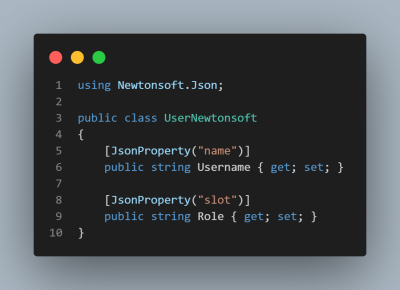
Fig. 2. Class using Newtonsoft.Json
From the investigation so far, it became clear that both System.Text.Json and Newtonsoft.Json were being used across the projects for various historical and practical reasons. The details of how this situation arose can be an interesting topic for a case study, however for the problem we faced it was no longer relevant as we had to address the issue and resolve this going forward.
For the sake of simplicity, maintainability, and to reduce confusion for future development, the team agreed that only one JSON serialization library should be used consistently across services. The next step was therefore to determine which library would best fit our needs and how to configure it properly in the system.
DIAGNOSIS AND SOLUTION
As mentioned in the previous section, the coexistence of two different libraries in Project A raised some suspicion. The fact that our classes relied on attributes for serialization and deserialization also seemed relevant. Although I had used both libraries before without encountering such issues, I had never combined them with attributes on fields, which prompted me to investigate further.
To approach the problem systematically, I first tried to reproduce the bug and confirm the de- scribed behavior. Once the issue was verified, I began to examine two possible root causes: the
configuration of the ASP.NET Core controllers, and the internal mechanisms of Flurl.Http. These two aspects ultimately explained why serialization behaved differently across our projects.
a) AddControllers() Configuration
In the Program.cs initialization, the call to builder.Services.AddControllers(); configures System.Text.Json as the default serializer for controllers. This means that even if attributes from Newtonsoft.Json are used in the code, the framework will not automatically know how to handle them. To properly enable Newtonsoft.Json, the configuration must explicitly include: builder.Services.AddControllers(). AddNewtonsoftJson();
Once this line was added and the class attributes were updated accordingly, requests were correctly serialized and deserialized using Newtonsoft.Json. This explained why, in our case, serialization from Newtonsoft.Json failed when paired with the default deserializer: the setup was incomplete.
b) Internal Mechanisms of Flurl
The second aspect of the issue was related to how Flurl.Http works internally. In our project we used Flurl version 3.x, and upon reviewing the package code and documentation, I confirmed that it relies on Newtonsoft.Json for serialization and deserialization. This means that any project using Flurl.Http implicitly depends on Newtonsoft.Json, regardless of the serializer chosen elsewhere.
In Project B, since HTTP calls were implemented with Flurl.Http, the use of System.Text.Json was not a viable option. This clar- ified why we could not standardize on System.Text.Json across both projects and why the team ultimately decided to unify around Newtonsoft.Json.
USING GLOBAL CONFIGURATION VS. ATTRIBUTES
Besides using attributes on properties, both Newtonsoft.Json and System.Text.Json allow configuring serialization behavior globally via JsonSerializerSettings and JsonSerializerOptions, respectively.
These global options can define general rules, such as:
- transforming property names (PascalCase → camelCase or snake case),
- ignoring null values,
- converting special types (enums, dates, ).
In some cases, global configuration can replace attributes and simplify code. However, this approach becomes insufficient when JSON property names and class property names do not follow a uniform pattern and are completely arbitrary.
For example:
- JSON: name → code: Username
- JSON: slot → code: Role
In such cases, no global rule can automatically map name to Username or slot to Role. For this reason, the team chose to use explicit attributes on properties to ensure correct mapping between JSON and objects.
CONCLUSION
In summary, the challenges we faced with JSON serialization stemmed from differing default libraries and incomplete configurations across our projects. By carefully investigating the interaction between System.Text.Json, Newtonsoft.Json, and dependencies like Flurl.Http, we identified why using a single library consistently was initially problematic. Addressing the missing configuration and understanding package dependencies allowed us to make an informed decision to standardize on Newtonsoft.Json. This choice not only resolved the 400 Bad Request errors but also improved consistency and maintainability in our system. I hope this insight helps others facing similar is- sues when managing JSON serialization in multi- service .NET applications.
FUTURE CONSIDERATIONS
It is worth noting that starting with version 4.x, Flurl.Http has dropped support for Newtonsoft.Json and now relies on System.Text.Json as its default and only supported JSON serializer. This represents a significant shift in the library’s direction and aligns with Microsoft’s broader push toward System.Text.Json as the standard serializer in .NET.
For teams currently using Flurl.Http 3.x with Newtonsoft.Json, this means that upgrading to 4.x will require adapting code and configuration to use System.Text.Json. While our team standardized on Newtonsoft.Json at the time of solving the described issue, future maintenance work may involve revisiting this choice once the ecosystem and dependencies evolve further.